
Salesforce Contract Lifecycle Management refers to the process of creating, executing, and managing contracts within Salesforce, with the aim of connecting contracts directly into the revenue system rather than treating them as separate legal documents.
This concept is central to Revenue Cloud suites that include Salesforce Contracts, extending from quoting through billing, renewals, and reporting. Salesforce defines contract lifecycle management as the process that covers contract creation, execution, and renewal in the system.
In modern revenue systems, contracts serve as the commercial record that links quotes from Salesforce CPQ or Revenue Cloud quoting engines into billing and fulfillment systems. Contracts capture pricing, terms, obligations, renewal schedules, and compliance checkpoints, which are essential for accurate billing and reporting.
A well structured contract lifecycle directly affects how orders and invoices behave later in the Quote to Cash process.
In this blog, you will learn how Salesforce handles contracts as part of its native data model and revenue lifecycle features, how contracts connect to quoting and billing, and what practices help ensure data accuracy for reporting and forecasting. All explanations are tied to Salesforce documentation and observed platform behavior.
What Salesforce Contract Lifecycle Management means
Contract lifecycle management increases visibility into contract status, obligations, milestones, and renewal opportunities. It helps teams stay on top of deadlines and ensures that revenue events such as renewals and billing milestones are not missed.
Efficient contract management also reduces revenue leakage by making contract data accessible and actionable across sales and finance teams.
Salesforce Contracts, as part of Revenue Cloud, lets you manage the entire contract lifecycle natively. This includes creating contracts from quote or order records, managing contract obligations, tracking contract history, and preparing contracts for renewal or amendment. Salesforce documentation highlights that contracts can be created from both quotes and orders and shared with external parties for review and negotiation.
Contracts in Salesforce are linked to other revenue objects such as Opportunities, Quotes, and Orders. This creates a continuous flow of data that ensures commercial terms agreed upon in the quote carry into the contract and then into billing and reporting. This linkage is essential for accurate revenue operations and end-to-end Quote to Cash processes.
Salesforce Contracts data model overview
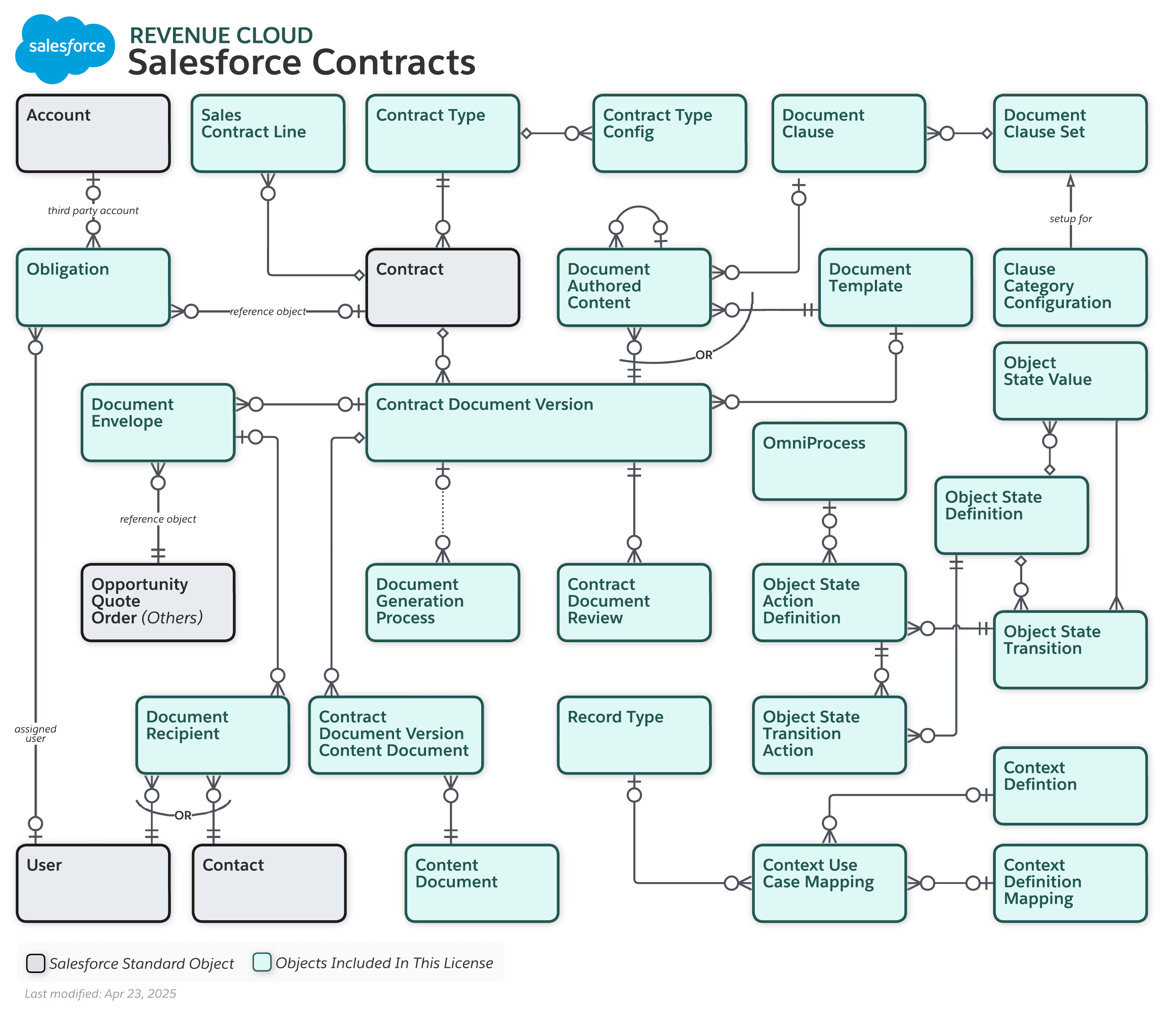
Core contract objects in Salesforce
Contract Line Item: Contract Line Items store product level details for each contract. These records capture quantity, pricing, and term information inherited from the quote. Billing and renewal logic relies on these line items rather than the contract header alone.
How contracts relate to other revenue objects
- Contracts can be associated with Opportunities
- Contracts can be created from Quotes or Orders
- Contract Line Items map to Quote Line Items
- Billing reads pricing and term data from contracts
Why the data model matters
- Invoice timing and amounts
- Renewal creation
- ARR and NRR calculations
- Revenue reporting accuracy
How quotes convert into contracts in Salesforce
Quote to contract conversion flow
- Opportunity is quoted using CPQ or Revenue Cloud quoting
- Quote Line Items capture pricing, quantities, and terms
- Quote is approved and accepted
- Contract is created using quote data
- Contract Line Items inherit quote line values
Data that moves from quote to contract
- Product references
- Quantities
- Pricing values
- Term start and end dates
- Billing frequency and selling model
Dependency on upstream configuration
- Product Catalog Management defines selling models
- Salesforce Pricing defines final prices
- CPQ rules enforce valid configurations
Why this matters for Quote to Cash
- Orders inherit contract values
- Billing generates invoices from contract terms
- Renewals reference contract end dates
Contract lifecycle stages inside Revenue Cloud
While the contract is active, multiple systems depend on it:
- Billing schedules read contract dates and selling models to decide when invoices are generated
- Order management uses contract line items to determine what must be fulfilled
- Subscription and entitlement tracking rely on the contract to reflect what the customer owns
Contracts rarely stay unchanged for their full term. Changes are handled through amendments, which update contract line items without overwriting historical context. Common amendment scenarios include upgrades, downgrades, quantity changes, and term extensions. Salesforce applies these amended values to future billing and renewal calculations.
As the contract approaches its end date, Salesforce uses the same contract data to drive renewals. End dates control renewal timing. Current contract values influence renewal pricing. Errors in contract setup usually surface here first, as forecast gaps or unexpected renewal values.
How contracts drive billing and revenue reporting
Billing schedules are generated using contract attributes such as start date, end date, billing frequency, and selling model. Contract line items supply quantities and prices that flow directly into invoice lines. Proration logic applies based on contract timing rather than manual billing rules.
Invoice creation follows this contract driven model closely:
- Unit price comes from the contract line item
- Quantity comes from the contract line item
- Invoice timing comes from the billing schedule derived from the contract
If the contract is wrong, invoices will be wrong. Billing does not correct upstream mistakes.
This is why contract design is a control point in Revenue Cloud. Errors introduced at the contract level propagate into billing, accounting, and forecasting. Fixing them later requires credit memos, rebills, and manual reconciliation, all of which slow down finance and erode trust in the system.
Contracts and Agentforce Revenue Management
Contracts provide the commercial boundaries that Agentforce uses to operate. Pricing, quantities, term dates, and selling models stored on contract line items are read by downstream orchestration, billing, and analytics layers.
In practical terms, this means:
- Order orchestration depends on contract line items to determine what must be fulfilled
- Subscription tracking relies on contract terms to understand entitlement state
- Revenue analytics uses active contract values to calculate ARR and renewal projections
Agentforce can automate reconciliation, exception handling, and insights, but it does not correct broken contract data. If contract terms are inconsistent with quotes or pricing rules, automation simply accelerates bad outcomes.
This is why Salesforce positions Agentforce Revenue Management as an extension of Revenue Cloud, not a shortcut around proper contract design. Clean contracts are a prerequisite, not an optional improvement.
Best practices for designing contracts at scale
Start with ownership. Contract structure should be jointly owned by RevOps and IT, with Legal contributing templates and clause language. Sales should not control contract fields or behaviors directly.
Align contracts tightly with upstream systems:
- Product catalog selling models must match contract term logic
- Pricing rules used during quoting must persist on contract line items
- Required billing fields must be populated at contract creation
Design contracts to change safely. Amendments should update future values without rewriting history. Renewal logic should reference contract end dates and current values rather than manual inputs.
Finally, test contracts end to end. Every contract design change should be validated by running a full flow from quote to contract to invoice to renewal. If that flow works without manual intervention, contract design is doing its job.
Well designed contracts reduce billing disputes, stabilize forecasting, and make revenue automation possible. Poorly designed contracts create silent failures that surface months later in finance and reporting.
0 Comments